
Calculate the product of three integers

درباره سایت
آخرین مطالب
- Printing multiple lines with a single printf in c
- Adding Two Integers in c
- if statements, relational operators, and equality operators
- Calculate the product of three integers
- Printing a Line of Text in cpp (چاپ یک متن در سی پلاس پلاس)
- Printing a Single Line of Text with Multiple Statements in cpp (چاپ یک خط چند جمله)
- printing Hello Qt in QT (چاپ سلام کیوتی در کیوتی)
- آموزش مخفی کردن پست در اینستاگرام – Archive آرشیو
- آموزش حذف اکانت اینستاگرام Instagram در اندروید
- نصب دو واتس اپ همزمان روی آیفون
امکانات وب
-------------------------------------------------
Comments
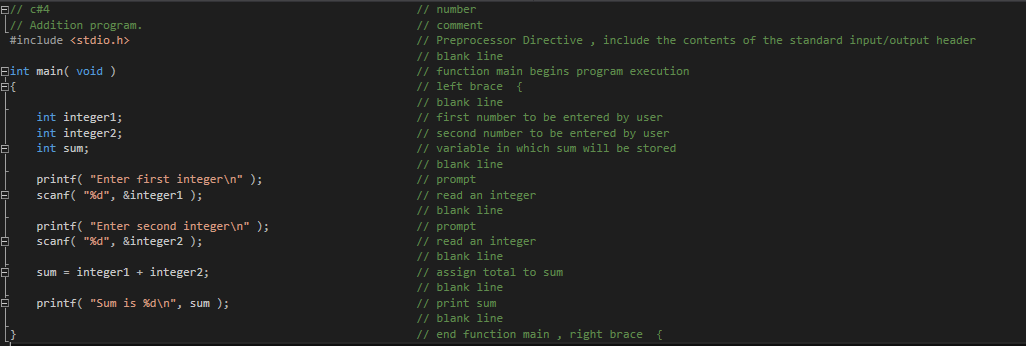
Comments Begin with //, indicating that these two lines are Idea. You insert Idea to document programs and improve program readability. Comments do not cause the computer to perform any action when the program is run. Comments are ignored by the C compiler and do not cause any machine-language object code to be generated. The preceding comment simply describes the figure number, file name and purpose of the program. Comments also help other people read and understand your program. You can also use /*…*/ multi-line Idea in which everything from /* on the first line to */ at the end of the last line is a comment. We prefer // Idea because they’re shorter and they eliminate common programming errors that occur with /*…*/ Idea, especially when the closing */ is omitted.
#include Preprocessor Directive
#include is a directive to the C preprocessor. Lines begiing with # are processed by the preprocessor before compilation.
< stdio.h > = C file input/output
The C programming language provides many standard library functions for file input and output. These functions make up the bulk of the C standard library header . The functionality descends from a "portable I/O package" written by Mike Lesk at Bell Labs in the early 1970s, and officially became part of the UNIX operating system in Version 7.
The I/O functionality of C is fairly low-level by modern standards; C abstracts all file operations into operations on streams of bytes, which may be "input streams" or "output streams". Unlike some earlier programming languages, C has no direct support for random-access data files; to read from a record in the middle of a file, the programmer must create a stream, seek to the middle of the file, and then read bytes in sequence from the stream.
The stream model of file I/O was popularized by UNIX, which was developed concurrently with the C programming language itself. The vast majority of modern operating systems have inherited streams from UNIX, and many languages in the C programming language family have inherited C's file I/O interface with few if any changes.
Blank Lines and White Space
You use blank lines, space characters and tab characters (i.e., “tabs”) to make programs easier to read. Together, these characters are known as white space. White-space characters are normally ignored by the compiler.
The main Function
The main Function is a part of every C program. The parentheses after main indicate that main is a program building block called a function. C programs contain one or more functions, one of which must be main. Every program in C begins executing at the function main. Functions can return information. The keyword int to the left of main indicates that main “returns” an integer (whole-number) value. For now, simply include the keyword int to the left of main in each of your programs. Functions also can receive information when they’re called upon to execute. The void in parentheses here means that main does not receive any information.
left brace { , right brace }
A left brace, {, begins the body of every function. A corresponding right brace ends each function. This pair of braces and the portion of the program between the braces is called a block. The block is an important program unit in C.The right brace, }, indicates that the end of main has been reached.
An Output Statement
Instructs the computer to perform an action, namely to print on the screen the string of characters marked by the quotation marks. A string is sometimes called a character string, a message or a literal. The entire line, including the printf function (the “f” stands for “formatted”), its argument within the parentheses and the semicolon (;), is called a statement.
Every statement must end with a semicolon (also known as the statement terminator). When the preceding printf statement is executed. The characters normally print exactly as they appear between the double quotes in the printf statement.
Escape Sequences
Notice that the characters n were not printed on the screen. The backslash () is called an escape character. It indicates that printf is supposed to do something out of the ordinary. When encountering a backslash in a string, the compiler looks ahead at the next character and combines it with the backslash to form an escape sequence. The escape sequence n means newline. When a newline appears in the string output by a printf, the newline causes the cursor to position to the begiing of the next line on the screen.
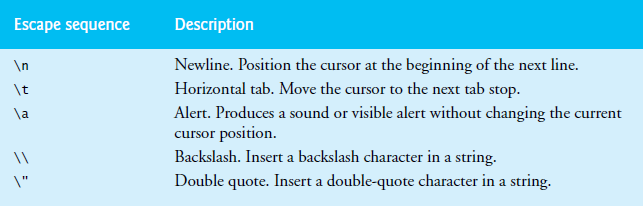
Because the backslash has special meaning in a string, i.e., the compiler recognizes it as an escape character, we use a double backslash (\) to place a single backslash in a string. Printing a double quote also presents a problem because double quotes mark the boundaries
of a string—such quotes are not printed. By using the escape sequence " in a string to be output by printf, we indicate that printf should display a double quote.
Prompting Messages
Displays the literal and positions the cursor to the begiing of the next line. This message is called a prompt because it tells the user to take a specific action. This printf also prompts the user to take action.
The scanf Function and Formatted Inputs
Uses scanf (the “f” stands for “formatted”) to obtain a value from the user. The function reads from the standard input, which is usually the keyboard. "%d", the format control string, indicates the type of data that should be entered by the user. The %d conversion specifier indicates that the data should be an integer (the letter d stands for “decimal integer”). The % in this context is treated by scanf (and printf as we’ll see) as a special character that begins a conversion specifier. &integer1 of scanf begins with an ampersand (&)—called the address operator—followed by the variable name. The &, when combined with the variable name, tells scanf the location (or address) in memory at which the variable integer1 is stored. The computer then stores the value that the user enters for integer1 at that location. The use of ampersand (&) is often confusing to novice programmers or to people who have programmed in other languages that do not require this notation. For now, just remember to precede each variable in every call to scanf with an ampersand.
When the computer executes the preceding scanf, it waits for the user to enter a value
for variable integer1. The user responds by typing an integer, then pressing the Enter key to send the number to the computer. The computer then assigns this number, or value, to the variable integer1. Any subsequent references to integer1. Functions printf and scanf facilitate interaction between the user and the computer. Because this interaction resembles a dialogue, it’s often called interactive computing.
Assignment Statement
Calculates the total of variables integer1 and integer2 and assigns the result to variable sum using the assignment operator =. The statement is read as, “sum gets the value of integer1 + integer2.” Most calculations are performed in assignments. The = operator and the + operator are called binary operators because each has two operands. The + operator’s two operands are integer1 and integer2. The = operator’s two operands are sum and the value of the expression integer1 + integer2.
Printing with a Format Control String
Calls function printf to print the literal Sum is followed by the numerical value of variable sum on the screen. This printf has two arguments, "Sum is %dn" and sum. The first argument is the format control string. It contains some literal characters to be displayed, and it contains the conversion specifier %d indicating that an integer will be printed. The second argument specifies the value to be printed. Notice that the conversion specifier for an integer is the same in both printf and scanf—this is the case for most C data types.
Rules of Operator Precedence
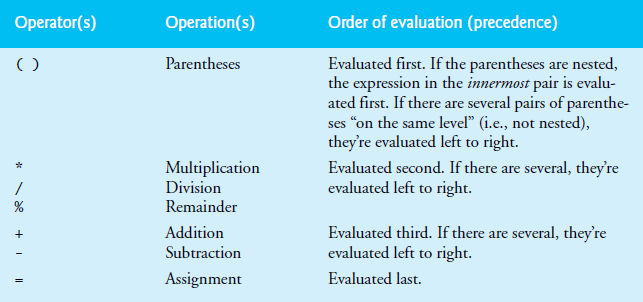
C applies the operators in arithmetic expressions in a precise sequence determined by the following rules of operator precedence, which are generally the same as those in algebra:
1. Operators in expressions contained within pairs of parentheses are evaluated first.
Parentheses are said to be at the “highest level of precedence.” In cases of nested,
or embedded, parentheses, such as

The operators in the iermost pair of parentheses are applied first.
2. Multiplication, division and remainder operations are applied next. If an expression
contains several multiplication, division and remainder operations, evaluation proceeds from left to right. Multiplication, division and remainder are said
to be on the same level of precedence.
3. Addition and subtraction operations are evaluated next. If an expression contains
several addition and subtraction operations, evaluation proceeds from left to right.
Addition and subtraction also have the same level of precedence, which is lower
than the precedence of the multiplication, division and remainder operations.
4. The assignment operator (=) is evaluated last.
The rules of operator precedence specify the order C uses to evaluate expressions.1
when we say evaluation proceeds from left to right, we’re referring to the associativity of the operators. We’ll see that some operators associate from right to left.
Decision Making: Equality and Relational Operators
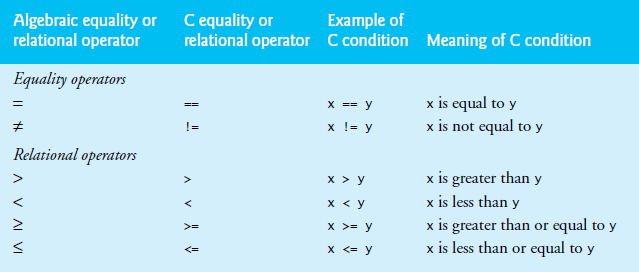
Executable statements either perform actions (such as calculations or input or output of data) or make decisions (we’ll soon see several examples of these). We might make a decision in a program, for example, to determine whether a person’s grade on an exam is greater than or equal to 60 and whether the program should print the message “Congratulations! You passed.” This section introduces a simple version of C’s if statement that allows a program to make a decision based on the truth or falsity of a statement of fact called a condition. If the condition is true (i.e., the condition is met), the statement in the body of the if-statement is executed. If the condition is false (i.e., the condition isn’t met), the body statement isn’t executed. Whether the body statement is executed or not, after the if-statement completes, execution proceeds with the next statement after the if-statement. Conditions in if statements are formed by using the equality operators and relational operators. The relational operators all have the same level of precedence and they associate left to right. The equality operators have a lower level of precedence than the relational operators and they also associate left to right. [Note: In C, a condition may actually be any expression that generates a zero (false) or nonzero (true) value.]
برچسب:
نویسنده: حسین رستمی